
Dynamo scripts: your Revit tasks automated
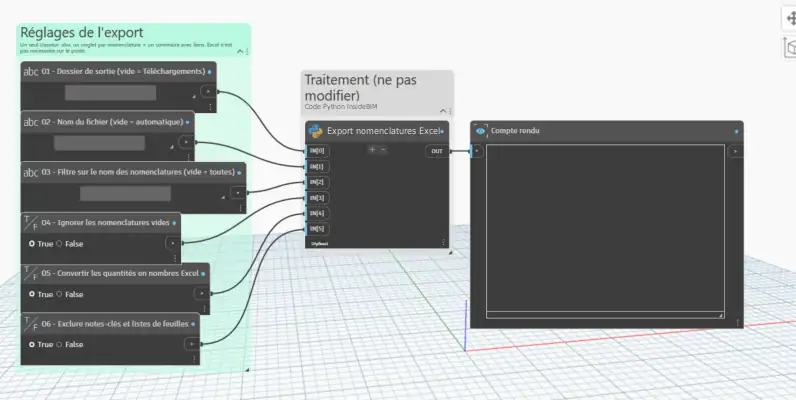
We program Dynamo and Python scripts that do the repetitive work in Revit for you: renaming, numbering, filling in parameters, creating views and sheets, exporting your schedules.
In 10 seconds
The problem, the solution, the result
1The problem
The same tasks come back on every project and tie up your technicians for hours.
2Our solution
A Dynamo script programmed for your task, with a simple interface, tested on your models.
3The result
What used to take an hour runs in one click, with no input errors.
What our scripts automate
The tasks that keep coming back
Data and schedules
Your information extracted from the model.
- Parameters filled in bulk
- Schedules to Excel
- Import from your spreadsheets
Views and sheet layout
Documentation produced automatically.
- Views by level or by zone
- View templates applied
- Sheets generated
Repetitive modelling
Rules applied across the whole project.
- Rule-based placement
- Automatic numbering
- Global updates
Before / after
What changes for your technicians
By hand
Hours of repetitive clicks
Input errors
Every project starts from scratch
Low-value tasks
With InsideBIM
One click to run the script
Accurate data
A tool reused on every project
Time given back to design
Our method
4 steps, no surprises
Analysis
You show us the task, we estimate the time saved.
Programming
Dynamo and Python script with an interface suited to your technicians.
Test
Validation on one of your real models.
Delivery
Script, user guide and improvements as your projects evolve.
Who is it for?
Anyone repeating the same steps
Engineering firms, fit-out firms, architects and contractors who repeat the same tasks on every Revit project. A script is often the first step towards a complete Revit toolbar.
FAQ
Frequently asked questions
Do I need to install Dynamo?
Dynamo is included in Revit. We deliver scripts ready to run, or built into a button on your toolbar for extra simplicity.
How much does a Dynamo script cost?
The price depends on how complex the task is. After a free first discussion, we send you an accurate quote with the expected time saving.
Will the script work in future Revit versions?
We test and adapt the scripts when versions change, as part of the follow-up.
A task to automate?
Show us the task and we will quote the script and the time saved.